iMovie is the best video editing program for Mac OS X. It readily shares HD video shots with your iOS device. With iMovie, you can easily create your own movies, and then burn iMovie videos to DVD?
Previously, you may use iDVD to finish this task. Yes, to burn iMovie video to DVD, make sure that you have the iDVD installed on your Mac. However, after OS X 10.8 Mountain Lion, iDVD is no longer offered or bundled as part of the iLife package. In this situation, a third-party Mac DVD burning software is highly recommended to burn a DVD from iMovie.
Here Tipard DVD Creator for Mac is highly recommended to burn video files to DVD with DVD Creator. This iMovie to DVD Burner software helps you convert iMovie video to DVD easily with massive beautifully designed DVD menu templates. You can also choose different output formats such as DVD discs, DVD folders, and ISO files to burn. Besides, the built-in video editor can also help you do some basic editing tasks for your video.
How to burn iMovie to DVD
1. Download the burning program DVD Creator for free.
2. Start the software by double-clicking on the icon.
3. Try to import your file saved to DVD Creator by clicking the “Add Files” button or just drag the file to the program control panel.
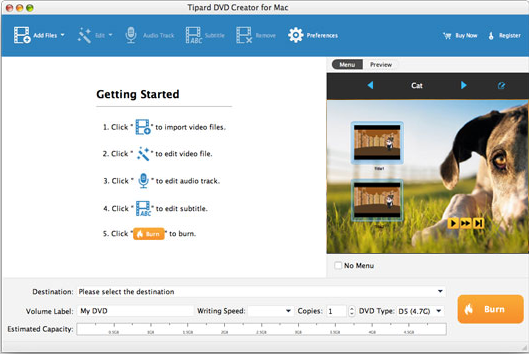
4. Choose the DVD theme and adjust the menu. There are many DVD menu themes that are built into the DVD Creator. You can choose the favorite and click the "Edit" button in the upper-right of the preview window to make your own DVD menu. Also, you can download more themes from the internet when you click the "download" button next to the menu drop-down list.
After burning complete, you can insert the disc to your DVD player and watch high quality movies on your home TV.
Supported DVD disc:
DVD-R
DVD-RW
DVD+R
DVD+RW
DVD+R DL
DVD-R DL
ReWriteable DVD
DVD-5
DVD-9

No comments:
Post a Comment